Kids and Games – Inspired by Penny Arcade

I like video games. Not just in the sense of spending a few hours a week playing them, but the development and design of them, their history in popular culture, and the unique ways the medium allows us to experience new places and characters like nothing before.

I’m also a parent with a daughter I love dearly. Which, as you can imagine, can create friction between the two interests. Kari loves video games too. We play Minecraft together – exploring caves and looking for diamonds and avoiding monsters. She knows what kind of games she can play – and why she can’t watch dad play his more mature games.

I’m lucky, I grew up with a Gameboy in my hands and had supportive parents that looked over my shoulder every once in a while. Some parents didn’t. I know folks whose first interaction with video games was via the unrelenting requests of their children to buy the latest Sega Super Mega Ultra Station 2000 for Christmas.

I was inspired by Mike Krahulik from Penny Arcade and decided to reach out to my daughter’s principal to see what I could do to help educate other parents on video games. Below is the email I sent to her this evening. If you’re an adult who cares about young people growing up in a positive gaming culture I urge you to do something. Communication and education is far more powerful than talking heads and fear mongering.

Dr. Vogelsang,

I’m Chris and my daughter, Kari Koerner, is in Ms. Parker’s 1st grade class.

Lately there’s been a lot of talk about video games in mainstream media. Katie Couric just did an hour-long piece that, while she has good intentions, makes video games look like something the devil came up with. Here’s a good retort if you’re familiar with the piece. The whole thing is a bit crazy and like most things, the truth lies somewhere in between.

I want to talk to other parents and teachers about video games. Not some boring 45 slide PowerPoint, but an honest chat with literal examples of what games are really like, how to find games that are appropriate, and how to guide our children to the right games, in the right context, at the right time.

This past March my family traveled to Boston for Spring break. Kari, Jackie and I went to a convention called Penny Arcade Expo or PAX for short. It’s a huge gathering of 70,000 gaming nerds from all walks of life. People who love board games, Dungeons & Dragons, card games, classic video games and yes, even the modern blockbuster titles we hear about in the news. People traveled thousands of miles to see new games and hang out with people who share the same interests. And you know what? It was the most amazing group of kind, interesting people I’ve ever met.

The guys who started PAX are behind a webcomic called Penny Arcade. It’s a series that is always mature and sometimes offensive, but spares no victim in being brutally honest about video games and the culture that surrounds them. They are very outspoken on issues such as this and just this morning posted an article about an idea they had. You can read it here (Warning: strong language). The gist, if you don’t wish to read it yourself, is that one way we can help is to educate other adults on the ins-and-outs of video games. They inspired me to reach out to you to see what I can do for Bowles and the Rockwood School District.

It’s awesome to be a nerd and I’d like to share my knowledge and enthusiasm with other parents and teachers. I threw together a rough outline that I hope might give an overview of what we’d talk about.

  • Explain what ESRB ratings mean. Show them how to use these ratings to determine appropriate purchases (There’s also a free and pretty awesome ESRB app for smartphones).
  • Demo some recent games of various ESRB Rating Levels.
  • Show what it’s like to play certain games (walk through a level from a couple different games).
  • Talk about hand-held gaming like Nintendo DS and Apple iPads. These systems too have very mature games (like Resident Evil) alongside Mario and Pokemon.
  • Talk about online gaming, like Xbox Live. What will kids hear when playing with anonymous strangers.
  • Talk about parental restrictions. All systems released in the past 7 years have some from of parental restrictions, many associated with the ESRB ratings.
  • Talk about social pressures. Kids want to be popular and included.
  • Talk about what impact parents can have on other children when they visit their house (to play video games).
  • Talk about how to educate other parents in a polite manner about video games, the ESRB and the implications of inappropriate gaming.

Let me know what you think. I’d love to grab lunch and chat if you’re up to it. If you have any ideas of a potential opportunity to get a group of interested parents/teachers in a room I’m all for putting something together.

Yours,
Chris Koerner
clkoerner.com

What I’d love to see from Flickr

A few comments from my good friends John Lamb1 and Kurt Werstein had me thinking about what I like about Flickr and why I keep using it when so many people have moved to Facebook, Google+, Zenfolio, 500px2 and the like.

I’ve been an enthusiast photographer for a while. According to Aperture I have taken over 26,000 photos in the past 7 years. I’ve recently started investing more time (and by association, money) into my hobby of photography with a recent camera purchase.
I’ve shared over 3,000 of my photos on Flickr. I love it and have consistently used Flickr since 2005. Recently it’s been chided as having missed the boat on things like social and mobile, but for reliably sharing images and finding other photographers (and their photos) it’s the best solution I’ve found yet.
I’m also an Aperture person, so I love the integration between the two. It makes my workflow more efficient and less frustrating than alternatives. In the past I would load the images into a folder, sort by hand to find those worth editing/sharing, load into Photoshop, edit and then export. Then, finally, upload to Flickr.
Aperture handles that all for me, even keeping the EXIF data intact including titles for my pics. Best part is that it can auto-create sets and import keywords to tags to boot!
While I’m a Flickr fan, I do admit that there are a few things that Flickr could improve in their offerings to avid and professional photographers alike. I’ve been jotting notes down for a few weeks now as I’ve thought about my relationship with Flickr. I have a few idea that I think are worth sharing.
I’ll update this article as I think of new things and hopefully as Flickr adds these features over time I’ll get to mark a few out. If you have a suggestion or an idea, please leave a comment.

Professional Views

Lightbox view on Flickr is great, but one click and you’re back to the normal Flickr. Give photographers the option to set themes for sets or collections. Great for pointing clients to review a set of photos.

Password protected sets or collections

Speaking of photographers sharing specifically with clients, let photographers share their stuff in a controlled way via passwords without requiring guests to have a Yahoo! account. Great for sharing proofs (or final edits) to a select group or individual client. I could see this being very popular for photographers shooting corporate events, weddings, birth announcements, etc. See Vimeo’s handling of password protected videos as an example.

Better monetization options

Give photographers a cut of print sales, more third-party companies to print to and allow photographers to create a ‘store front’ for select photos. Like the professional views idea above, let photographers edit a few areas to make things look professional.

Individual licensing

This is related and a fairly recent trend. Cut out the middlemen (Getty, Shutterstock, etc.) and let people (professional, semi-pro and casual) market directly to other individuals looking for photography.

Less page refreshes, more visible metadata


I’d love quicker access to common metadata – having to click and wait for a second page load sucks. I love looking at a photo at a large size and seeing what other people are doing with the same gear – or with gear I’m interested in. I love photos where I go, “Huh, how did they do that?”
Make this a modal AJAX element of the information. When I click the + next to the ‘Taken with a xx’ have some of the high level EXIF data present such as lens, aperture, shutter speed, ISO and time of day.


Update: It’s not perfect (I think it should be higher on the page) but Camera Settings (EXIF) is now on the photo page!

Better mobile apps

The current Flickr mobile site and iOS app are rather lackluster. Let people upload from their smart phone to the site without the app. (iOS 6 FTW!) Allow group participation on Flickr to be as easy as Facebook or Twitter for mobile interfaces. Let me comment and share to groups with ease. I want to see notifications when people comment on a photos, add as a favorite, or reply to a comment.

Better Groups

Groups are great nodes in the big web of photographers on Flickr. They’re focus points of attention across a sea of individual photos. Give Flickr groups a shot in the arm with a more modern interface. Threaded comments, voting and collapsible navigation. Let me see past comment history from folks. Allow folks to upload more than 6 photos at a time and give me Facebook-like notifications when activity has occurred in a group. Let people like a photo directly from every embed – like you can in justified view. Use the tags, titles and set/collection names to suggest related groups that I might be interested in. Do I tag a lot of photos in Seattle? Invite me to Seattle-related groups. Are most of my photos taken at night? How about some night photography groups?

Better Stats

I’m spoiled by Google Analytics, WordPress.com and Facebook metrics. Flickr gives you some basic stats, but I’d love to see timeline views for individual photos over a range greater than the past 30 days. Let me see how different ways of publicizing my photos impacts its views over time.
Give photographers better stats on where people are coming from. A lot of my referrals are internal to Flickr. Tell me where on the site are they coming from. Are most of my views from random keyword searches, groups I participate in, people who are contacts, etc?

Find people

Help me find people with similar tags, group membership, geographic location of photos (and profile). One of the great things about Instagram is the ability to quickly find existing friends from Facebook and Twitter. (Yes, I’m aware that the Twitter contact function was removed in a recent update.) Figure out a way to plug me in to as many folks as possible. Make recommendations intelligent and unobtrusive.
This is really just a list of desired features and not a deeply substantial or cohesive strategy for moving Flickr forward. I do enough of that in my day job!
I hope these ideas give a hint of a bigger picture and some suggestions to move things forward. I know there are smart, passionate and creative people working on Flickr – people who are far more intelligent than I in figuring out what Flickr needs.
I have high hopes for those folks. There’s plenty of positive movement with Yahoo’s new CEO, the great team that continues to support Flickr and the recent news about the SVP over Flickr having a past as a National Geographic wildlife photographer. I don’t think Flickr is dying, but I do think it needs a good shot in the arm.

Photography

“Photography is rooted in the rich culture of amateurism. What’s happening today is similar to the original proliferation of Kodak’s Brownie camera starting in 1900. An inexpensive and easy-to-use camera in every hand didn’t usher in the end of photography or automatically turn everybody into Richard Avedon.

Photo apps won’t magically give Jane the smartphone photographer a better sense of composition, or lighting, or framing. The apps and filters only change a photo’s look and aesthetic feel. That doesn’t make it a better photo. If you put lipstick on a pig, it’s still a pig.”

I could practically quote the entire essay from Richard Koci Hernandez. He is far more eloquent in defining what I’ve felt for a long time about photography (or any art) and technology.

Another choice quote referenced in the video essay,

“When people ask what equipment I use, I tell them my eyes.”

– Ansel Adams.


Remix

“Remixing is the adoption, alteration, and recombination of pre-existing cultural texts (songs, literature, paintings, etc.) to create something new.” (Wikipedia)

Remixing is not inherently a negative word. It has become one for many people due to it’s often used association with copying and plagiarism.

Copying something is directly reproducing the existing work with no new interpretation and no credit to the original artist. This does nothing to move things forward. It is duplication.

Remixing is paying homage. It’s being aware of the elements of a prior work that inspire you and being untroubled (on purpose or unexpectedly) of those that don’t.

If someone came to you after giving a presentation on a new idea, product, service you were developing and said, “That’s just a remix of Picasso and thermodynamics.” it would be considered negative. This is because someone used the word remix using the negative definition; of copying and plagiarism.

It would also be rude to approach anyone after a presentation with negative laden criticism, but that’s another story.

If someone came to you after presenting your work and said, “That’s an interesting approach. I never thought to combine Picasso and thermodynamics.”. That would be a complement. The critic would have made the connection (explicit or implicit in your presentation) between two previous works and seen the unique value of combining the two inspirations.

All work is influenced by prior work. Which in turn was inspired by even older prior work. Continuing ad infinitum. No new work exists without influence – even if that influence is to do the exact opposite!

I see remix (and the surrounding culture) the penultimate way of expressing how we’re all interconnected – that every action ripples out and causes new twists and turns down unexplored paths. This is comforting, positive and powerful. It moves things forward and is an intrinsic part in making anything new.

—-

Inspiration can also happen within a single body of work. See this image of BMW cars over the years and this one of Apple iPhones.

Another recently oft-cited example of remix at work: http://gizmodo.com/343641/1960s-braun-products-hold-the-secrets-to-apples-future

Side note: I chuckled to myself while writing this. I just remixed the negative language of remix to come up with a positive definition of remix. I remixed remix.

Notifications are Bad and You Should Feel Bad

This is a rant against notifications.

Notifications are those things you have on your phone, tablet or computer that pop up in the corner of your screen when you get an email, meeting invite, Twitter reply, or a file change in Dropbox.

I’d even extend the buggery of notifications to the badge alerts for anything not mentioned in this footnote3. Why do I need a badge on my Draw Something icon? Of course there are people in there waiting for me to play. That’s the entire premise of the app!

If you’re like me, every time I see little red badge holding a number I get anxious. I need to check that app! I have to get rid of the number! I don’t care if my Aunt called me and left an important voicemail – I’m going to open the Phone app just to make the badge go away.

We don’t need the mental stress of being reminded of things that are not immediate to the work we’re doing.

Outlook has had these pop-ups for years4 and on the Mac, Growl has been around for a while and quite successful. Notification Center in iOS and now OS X Mountain Lion continue the trend of annoying people under the guise of productivity.

These things are useless. Out of the box, you’re likely to have half a dozen or more applications vying for your attention. The promise of notifications is that you’ll be more productive – quicker to react to things that require your attention.

After a few weeks with Mountain Lion, here’s the apps that are in Notification Center:

Not pictured: Twitter, Google Chrome, Tweetbot and Mail!

Notifications give you the false impression of being productive, but in reality they merely distract you from whatever focused work you were trying to accomplish. It’s a pavlovian response when you hear that ding that you need to act upon it. Most people, myself included, don’t have the willpower to simply ignore those chimes, dings and rings. We have to look.

I use to love notifications. I used Growl for a long time5, and when I got my first iPhone Notification Center was filled with dozens of apps. I use to think, “What if I get a Game Center request? What if I get a super awesome email at 11 o’clock at night!?

But that’s the rub, innit?

Notifications are useless. You don’t need them. They are distracting, they break your train of thought and inhibit your ability to focus on whatever task you’re working on. Even if you ignore them, your subconscious spends time pondering the content while you try to continue working on what is in front of you.

So here’s a challenge. Turn off some of  your notifications. Pick five apps that display a pop-up or a badge and turn them off for a week. See what happens. I bet dollars to doughnuts that you don’t notice they’re missing. You might even notice (see what I did there) that you’re a little more focused on the essential than the urgent.

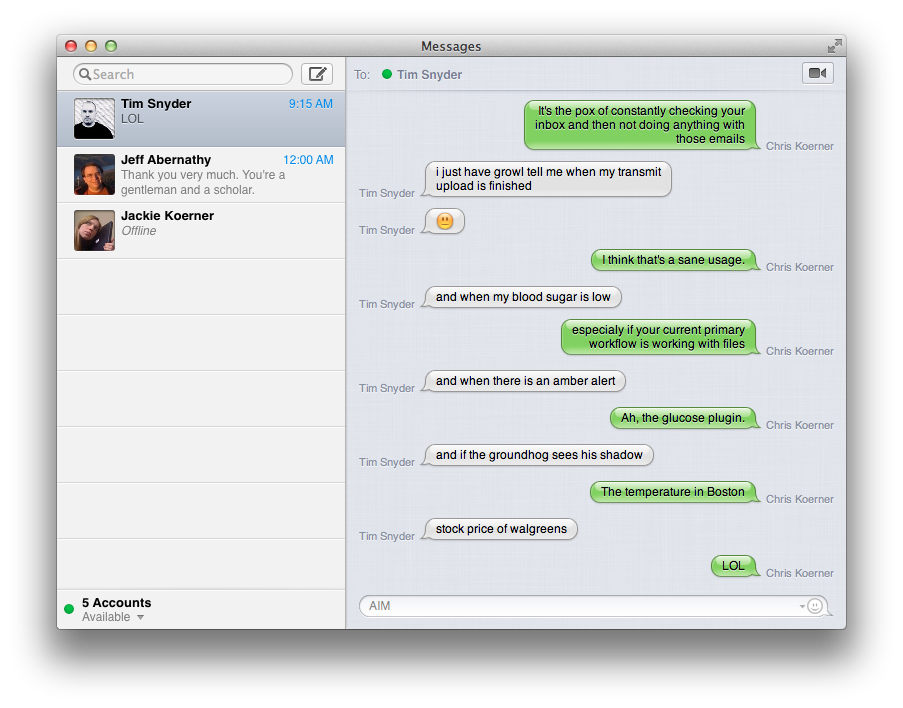
Bonus: As I was writing this, my good friend and I cracked a joke.